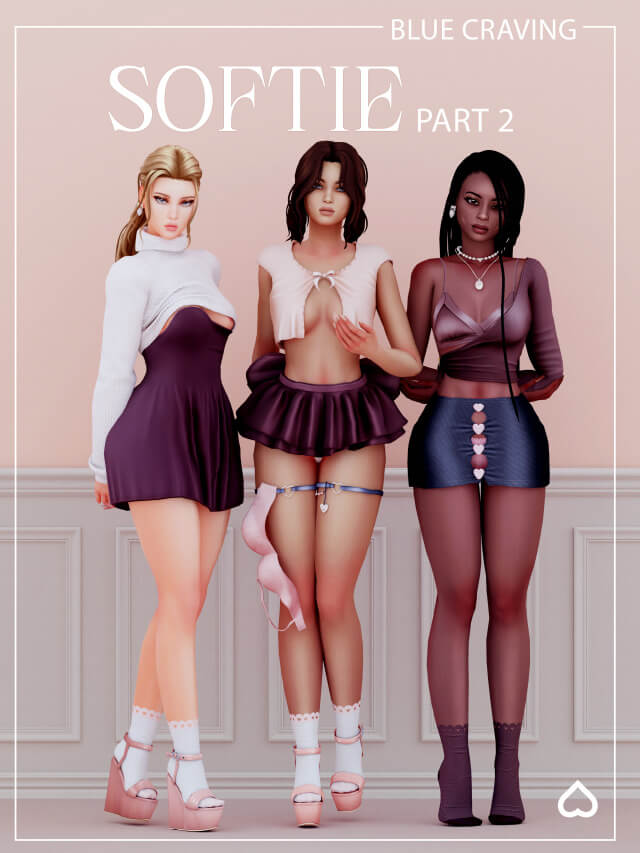
Sims 4 CC Lookbook: Softie Part 2 Collection Overview
If you love curating cozy, aesthetic, and ultra-feminine outfits for your Sims, building a versatile wardrobe is an ongoing adventure. The custom content (CC) community never ceases to amaze with gorgeously textured clothing sets, delicate accessories, and trendy silhouettes that elevate standard game clothing into high-fashion masterpieces.
Welcome to Softie Part 2—a curated showcase of dreamy, delicate, and charming items designed to give your Sims the ultimate soft-girl aesthetic. Whether your Sim is lounging at home, heading out for a casual daytime coffee date, or dressing up for a cozy evening snapshot, this collection brings together some of the most adorable pieces currently trending in the community.
In this guide, we will break down every item featured in the Softie Part 2 release, explore styling tips, and explain why these specific pieces are absolute must-haves for your Sims 4 Mods folder.
Featured Items in Softie Part 2
This collection focuses heavily on soft textures, pastel palettes, subtle bows, and chic layering options. Here is a breakdown of every piece included in the set:
1. Satin Wrap Top
- Status: Public Released
- Style Notes: Silky, elegant, and effortlessly chic. The satin texture catches the in-game lighting beautifully, giving high-end realism to your Sims’ outfits. It features a flattering wrap design that pairs wonderfully with both high-waisted skirts and denim jeans.
2. Wedge Sandals & Socks
- Status: Public Released
- Style Notes: The layered sock-and-sandal trend is a staple of modern cozy street fashion. This footwear combination adds an instant layer of youthful charm, making it a versatile shoe choice for spring and autumn outfits.
3. Heart Cutout Skirt
- Status: Public Released
- Style Notes: Playful yet trendy, this skirt features a subtle, eye-catching heart cutout detail that elevates it from a basic mini skirt to a standout statement piece. It works seamlessly with tucked-in tees, crop tops, and sweaters.
4. Lingerie Thigh Garter
- Status: Accessories / Undergarments
- Style Notes: A delicate touch of detail for intimate wear or edgy-soft hybrid outfits. This garter accessory adds depth and complexity to layering options, perfect for detailed CAS (Create-A-Sim) portraits.
5. Slipping Dress
- Status: Clothing / Dresses
- Style Notes: Designed with relaxed, off-the-shoulder draping, the slipping dress embodies the ultimate lazy-day comfort aesthetic. It creates a soft, approachable silhouette that looks incredible in indoor gameplay and screenshots.
6. Heart Drop Earrings
- Status: Jewelry / Accessories
- Style Notes: Small details make a huge difference in The Sims 4. These minimalist heart drop earrings frame your Sim’s face delicately, adding a subtle sparkle without overwhelming hairstyles or face presets.
7. Bow Skirt
- Status: Clothing / Bottoms
- Style Notes: Coquette fashion is having a massive moment, and bow motifs are at the center of it. This skirt incorporates sweet ribbon accents that lean heavily into the romantic, soft-girl aesthetic.
8. Layered Necklace
- Status: Jewelry / Accessories
- Style Notes: A delicate multi-chain necklace that sits comfortably on various necklines. It fills negative space on tops and dresses, adding a polished, put-together finish to any look.
9. Bow Top
- Status: Clothing / Tops
- Style Notes: Featuring prominent ribbon details, this top is the crown jewel of the soft aesthetic. It balances cute and stylish elements, making it an instant favorite for everyday wear.
Styling Tips for the Softie Aesthetic
To get the most out of these custom content pieces in your game, try out these styling combinations:
- Mix and Match Textures: Pair the glossy finish of the Satin Wrap Top with the matte fabric of the Heart Cutout Skirt for visual contrast.
- Layer Smartly: Combine the Layered Necklace and Heart Drop Earrings with low-cut tops like the slipping dress to maximize accessory visibility in CAS portraits.
- Color Coordination: Stick to soft pastels (baby pinks, creams, muted lavenders, and soft sages) to make the items in the Softie collection truly pop against standard neighborhood backgrounds.
How to Download and Install Custom Content
Adding these items to your game is quick and easy:
- Check Your Game Settings: Ensure that Custom Content and Mods and Script Mods are enabled in your The Sims 4 game options menu.
- Download the Files: Locate the public release links for the items listed above from the creator’s official pages (such as Patreon or CurseForge).
- Move to Mods Folder: Extract the downloaded
.packagefiles and place them directly into yourDocuments > Electronic Arts > The Sims 4 > Modsfolder. - Launch and Style: Open your game, jump into CAS, and start building your Sim’s new wardrobe!
What is your favorite piece from the Softie collection? Let us know how you style your Sims in the comments below!
WickedWhims and Animations Folder
By : sims4ccworld